Send us the CMMS data mess. You approve the import file.
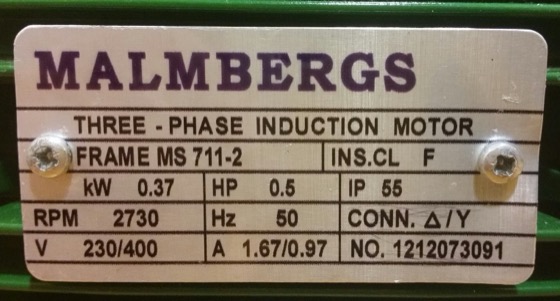
The nameplate photos your techs shot in the dark. The 2019 spreadsheet nobody trusts. We rebuild it into your CMMS import file — every uncertain value flagged, never guessed.
PackFields is a CMMS migration data cleanup service. We read your nameplate photos and old asset spreadsheets, match every value against your approved reference lists, flag every uncertain value for your review, and deliver a clean import file for Fiix, Maximo, eMaint, SAP PM, or Limble. Nothing imports until you approve it.
| Asset_ID | Description | Location | Mfr | Serial |
|---|---|---|---|---|
| P2-VFD-008 | ACS580 Drive | WTP MCC2 | Baldor | 3AUA000… |
| P2-FLW-003 | Flow Meter | WTP Lvl1 | E+H | — |
| P2-LVL-009 | Level Sensor | EQ Tank | Siemens | L2A-044… |
| P2-VFD-008 | ACS580 Drive | Pump House | ABB | 3AUA000… |
| Asset ID | Manufacturer | Serial | Status |
|---|---|---|---|
| P2-VFD-008 | ABB | 3AUA0000039232 | import-ready |
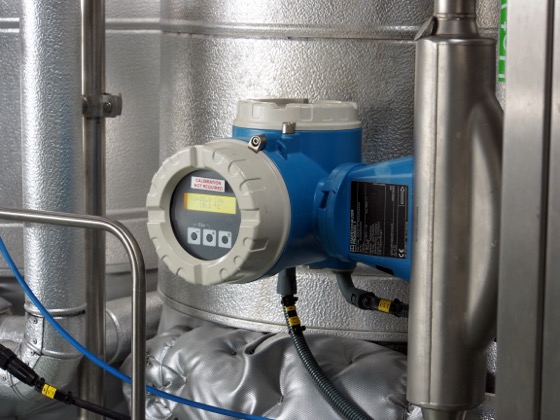
| P2-FLW-003 | Endress+Hauser | A501D234…photo | needs you |
| P2-LVL-009 | Siemens | location: 2 candidates | needs you |
| P2-VFD-008 | ⧉ duplicate — same ID + serial | duplicate | |
- 1Send your files
- 2We match & flag
- 3You approve
- 4Import-ready
One serial typed wrong is one PM that never fires.
One asset that silently never gets inspected. One location code that doesn't match, so the tech can't find the equipment. That's the cell you're approving — so you approve it looking at the nameplate, not trusting a guess.
The 2019 export, the duplicate IDs, the location names that drifted — asset codes that repeat, serial columns half-empty, the same location typed four ways. We don't ask you to clean it first. Send it the way your team keeps it today.
You send what you have. We send back what your CMMS needs.
We match against approved manufacturer, location, and asset class lists.
Not a generic database. We match every value against the reference lists you approve — your manufacturers, your location hierarchy, your asset classes. If you don't have them yet, we draft them from your files.
Matched, flagged, or held — never guessed.
You review what we flag. We do the rest.
You only touch what we flag.
Records that match approved reference lists are marked import-ready. You open the few we weren't sure of, look at the evidence, and approve. Your name goes on the import — so we make sure you can stand behind every value.
Nothing is marked import-ready until you approve it. Every value in your file was either matched to approved reference lists or reviewed by you.
The file we deliver.
A 4-sheet workbook: the import file, the exception log, the alias table, and a source-evidence index so every value traces back.
4 corrections. ~74 records skip review.
Every alias you approve is saved to your project. The next batch already knows it — so the pile that needs your review keeps shrinking.
A generic tool reads your nameplate the same on day 1 and day 500. Your project remembers every decision you've ever made.
Tell us about your pile. We'll scope a diagnostic batch.
A diagnostic batch covers up to 100 assets — enough to see the import file, the exception list, and how much review your data actually needs.
Your deliverable: a multi-sheet XLSX containing the import file for your CMMS, an exceptions log, an alias table of every correction, and source files organized by record so you can trace any value back to where it came from.
Prefer to just email? [email protected] — send us whatever you have.
Common questions.
Can you clean messy CMMS asset data — duplicates, missing serials, inconsistent locations?
That's the point — send it the way your team keeps it. We read what's readable, flag what isn't, and report what's missing. You never get a false "all clear" on a serial we couldn't actually read.
Do we need clean reference lists before starting CMMS data migration?
We can draft them from your files, and you approve them before we match anything. Building your reference lists is part of the work, not something you have to finish first.
Which CMMS do you import to?
We build to your target system's import format — Fiix, Maximo, eMaint, SAP PM, Limble, or a custom template. If the file won't load, we fix it.
My CMMS vendor offers migration support. Why would I need this?
Your vendor's migration support helps you import a clean file. We help you build the clean file. If your data is already in one spreadsheet with consistent names and complete serials, you probably don't need us — use your vendor's import tool. If your data is scattered across an old export, technician photos, and location lists that don't match, that's the work we do. We turn the pile into the file your vendor's tool expects.
How do you handle our data?
Your files are encrypted in transit and at rest, processed on infrastructure in Canada, and deleted within 30 days of project delivery. We don't train models on your data. We'll sign your NDA before the project starts — ask us on the scoping call.
Does CMMS data cleanup use AI or manual data entry?
We use AI to read the photos and spreadsheets. But you're buying a clean import file you approve — not an AI subscription. When the AI is uncertain, it flags the value for your review. It never guesses into your file.